
Linked Phone Business Number
LinkedPhoneBusiness
3.7376.00 Reviews
- Version
- 22.4.0
- Installs
- 50.00K
- Age Rating
- Everyone
Screenshots
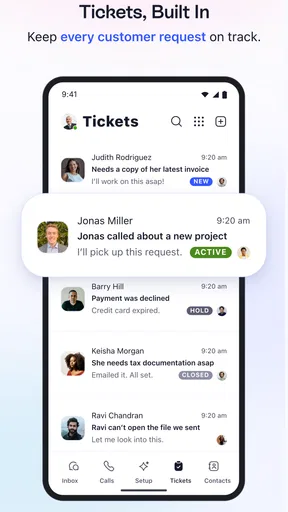
Our Review of Linked Phone Business Number
 Analysis by Appyee
I judge a second-line app less by the promise of looking professional and more by the boundaries it can help me keep. A business number is useful only if it fits the way I actually handle calls, messages, and time away from work. Linked Phone Business Number is a business app from LinkedPhone that offers a way to add a separate number on the phone I already carry. That makes it worth considering for solo operators and small teams who want a clearer division between customer contact and personal life, without immediately taking on a second handset.
That convenience also calls for a measured approach. A separate number can reduce how often I share my personal one, but it does not by itself establish what information an app collects or how it is handled. I would check the permissions and privacy details shown on my device and in the app before putting customer conversations through it. I would also avoid treating a business line as a secure archive for sensitive material unless I had independently verified the relevant protections. That’s not a reason to dismiss the app; it’s a practical boundary for any communication tool.
Trust begins with what I can check
The app is free to download, with optional in-app purchases listed from $0.99 to $99.99 per item. I’d look carefully at the choices presented during setup and before committing to any purchase, especially if I only need a basic line. Its age rating is Everyone, and the current version is 20.0.8. Those facts help set expectations, but they are not a substitute for reviewing the actual settings and prompts I see on my own device.
For perspective, it has an average rating of 3.8 from 849 ratings, with 372 written reviews, and more than 50,000 installs. I read figures like those as context rather than proof that the app will fit my workflow. For a tool that handles business calls, I’d pay more attention to whether the number is easy to manage, whether the available controls suit my schedule, and whether the purchase terms make sense for the way I plan to use it.
Keep the line useful without over-sharing
Before sharing a new business number widely, I’d test it with a trusted contact and confirm that calls and messages reach the intended place. I’d also decide where the number belongs: a website, a customer invoice, a public profile, or only direct conversations. That small bit of planning makes the separation more meaningful; otherwise, it is easy to hand out the new line everywhere and then find that it has become another channel to monitor constantly.
Notifications deserve the same thought. If customer messages appear on a lock screen, someone nearby may see part of a conversation even when the app itself is protected by the phone’s usual controls. I’d review notification previews and the device’s privacy settings before using the line for sensitive client exchanges. This is a general, practical check rather than a claim about a specific permission or security feature in LinkedPhone.
LinkedPhone’s business app sits in a crowded category that includes a second SIM, a separate work phone, and business calling services. A second SIM may suit someone who wants both numbers handled by the phone’s built-in dialer, while a dedicated handset can create a stronger physical boundary between work and home. The app-based route is appealing when carrying another device feels excessive, but its usefulness depends on the controls, calling behavior, and costs that matter to your own routine.
Who will get the most from a second number?
I can see this fitting a freelancer who takes appointment inquiries, a home-based seller who wants customers to have a contact number, or a consultant who needs to stop giving out a personal number. A realistic day might start with checking new client messages over breakfast, taking a scheduled call between other tasks, and silencing work notifications after closing time. The point is not to make every interaction automatic; it is to create a distinct contact route and decide when to respond.
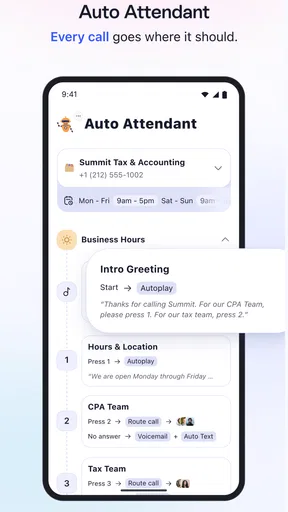
Before relying on any advertised call-handling option, I’d test it with a call outside the hours I intend to set and check what the caller experiences. If voicemail or forwarding is part of the setup available to me, I’d confirm the destination and greeting rather than assume the default is suitable. Likewise, I’d send a test message before printing the number on a flyer. These checks are especially worthwhile when missed inquiries could mean a lost booking.
Where the trade-offs become important
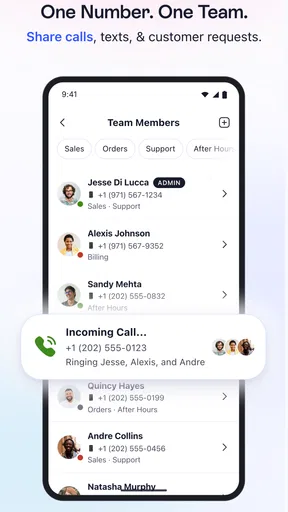
A second number is not the same as a complete customer-service system. If several employees need shared access, a record of every interaction, or coordinated assignment of incoming requests, I would compare dedicated business phone platforms before choosing a lightweight line app. And if I need a firm off switch, a separate work handset may be clearer than relying on notification settings and personal discipline. LinkedPhone is most attractive when the goal is a practical additional number, not a substitute for a larger communications setup.
I’d also think about continuity. If a phone is replaced, an account is signed out, or the number is no longer needed, I want to know how I can regain access or manage the line before depending on it for customer contact. I would check the account options available in the app and keep essential business contact details somewhere I control. That is ordinary preparation, not evidence of a problem; it simply prevents one app from becoming the only place I know how to reach a customer.
One useful habit is to keep the business line’s purpose narrow. For example, I might use it for new inquiries and appointment changes while keeping existing personal contacts on my regular number. That makes it easier to tell which messages need a work response and gives me a more realistic chance of stepping away after hours. If customers begin using both numbers interchangeably, the separation can quickly lose value, so I’d tell them which line to use and stick to that convention.
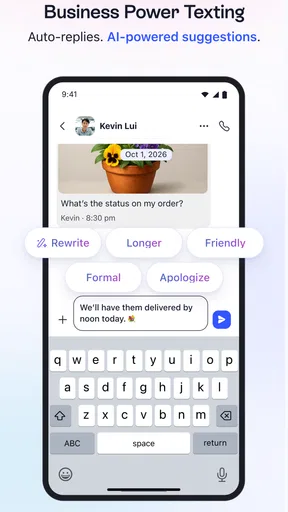
Another trade-off is how much automation feels appropriate. Auto-replies can acknowledge a message when I’m occupied, but a generic response may sound impersonal if clients expect a detailed answer. I’d keep any reply concise and make sure it sets a realistic expectation rather than promising an immediate response. For a business built around urgent support, a simple second line may not be enough; a staffed service or a more structured phone platform could be a better fit.
The app is free to start, but that does not mean every useful option will be included without charge. Because optional purchases span a broad range, I’d check the purchase screen for what each choice unlocks and whether it is recurring or one-time before proceeding. I would make that decision based on actual needs, not on the assumption that a paid option is necessary to get started. If I only want to test whether customers will use a separate number, I’d first establish the basic workflow and then reassess.
Your Business on a Separate Line
One of the standout features of the Linked Phone Business Number is its ability to give you a professional edge by providing a separate business line on your existing device. No more carrying around an extra phone just for work. It’s like having your cake and eating it too!
Setting it up was a breeze. All I had to do was download the app, follow the straightforward setup instructions, and voilà, I had a new number ready to go. It integrates seamlessly with my phone, so there was no complex tech jargon to wade through. I especially appreciated how quickly I was able to get everything up and running.
Features That Make Life Easier
Let’s dive into some of the features that make this app a game-changer. Firstly, the call routing and forwarding options are top-notch. I can set business hours, and any calls outside those times get directed straight to voicemail. No more late-night interruptions from work calls!
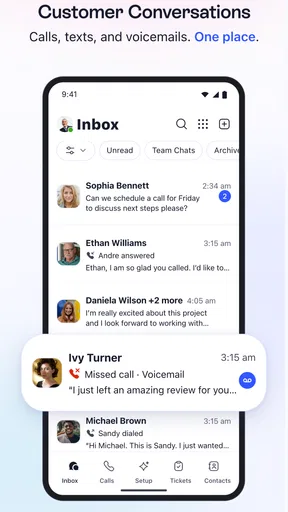
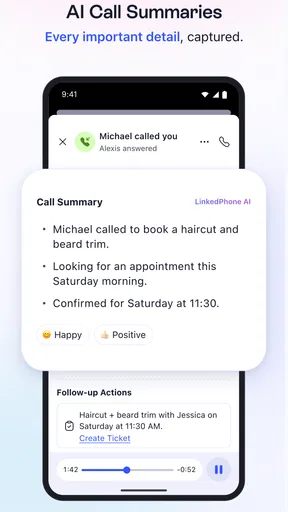
Speaking of voicemail, the app’s voicemail transcription is a lifesaver. I can read my messages instead of listening to them, which is perfect for when I’m on the go. The app also supports text messaging, so I can send and receive messages from my business number without any hassle.
Simplifying Communication
Another feature I love is the ability to create auto-replies. If I’m in a meeting or busy with another task, the app automatically sends out a polite message to let my clients know I’ll get back to them soon. It’s these small touches that really elevate the user experience.
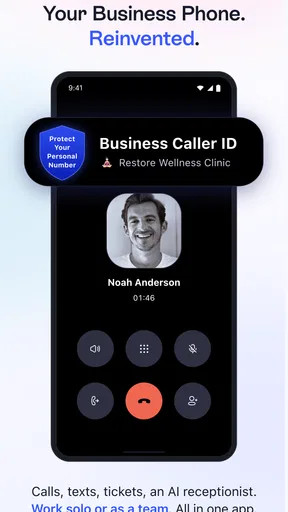
Additionally, the app provides a professional caller ID, which is a nice touch. It displays my business name instead of just a phone number, which adds a level of professionalism I didn’t know I needed until now.
Security and Privacy
Security is a biggie for me, and I was pleased to see that the app takes this seriously. It keeps my personal number private and separate from my business line, so I never have to worry about clients calling my personal number by mistake. Plus, all communications are encrypted, keeping everything safe and sound.
Final Thoughts
At the end of the day, the Linked Phone Business Number is a solid option for anyone looking to streamline their business communications without the added hassle of a second device. It’s intuitive, feature-rich, and most importantly, it works seamlessly with my day-to-day operations.
Whether you're a small business owner, freelancer, or just someone looking to keep work and personal life separate, this app could be just what you need. I’m definitely keeping it in my toolbox, and I suggest giving it a try if you’re in the same boat. It might just make your business communications a whole lot easier.
My cautious recommendation is to treat it as a convenient boundary tool, then verify the parts that matter in your own setup: test how customers reach you, review the account and purchase choices, and decide when work notifications should stop. If you want a separate business number on your existing phone and do not need a full team phone system, it is a sensible option to explore. If privacy documentation, shared workflows, or a physical separation between work and home are essential, I’d compare alternatives first. That distinction is what makes the app useful for the right person rather than an automatic choice for every business.
Verdict
Strengths of Linked Phone Business Number
- Seamless integration with existing contacts.
- User-friendly interface for easy navigation.
- Affordable pricing plans for small businesses.
- Reliable call quality and connectivity.
- Offers voicemail transcription service.
Limitations of Linked Phone Business Number
- Limited customization for call settings.
- No desktop version available.
- Occasional app crashes reported.
- Requires strong internet connection.
- Limited customer support availability.
Similar Picks in This Category
View All
LinkedIn: Community & Network
LinkedIn3.8

Zoom Workplace
zoom.com4.1

Microsoft Teams
Microsoft Corporation4.6

Meta Business Suite
Meta Platforms, Inc.4.6

Webex Meetings
Cisco Systems, Inc.4.5

TeamViewer Remote Control
TeamViewer4.4
Frequently Asked Questions
What is Linked Phone Business Number and how does it work?
Linked Phone Business Number is a virtual phone service that allows businesses to manage calls and messages through a dedicated number without needing additional hardware. It works by routing calls through the internet, enabling seamless communication across multiple devices such as smartphones, tablets, and computers. This flexibility helps businesses stay connected with their clients anytime, anywhere.
Is Linked Phone Business Number suitable for small businesses?
Yes, Linked Phone Business Number is ideal for small businesses. It offers affordable plans that cater to various business sizes, providing essential features like call forwarding, voicemail, and team extensions. This service helps small businesses maintain a professional appearance while managing communication efficiently, without the need for expensive phone systems.
What features does Linked Phone Business Number offer?
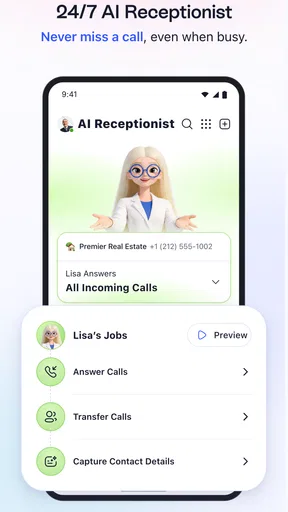
Linked Phone Business Number offers a range of features designed to enhance business communication. These include call forwarding, voicemail-to-email, team extensions, text messaging, and call recording. Additionally, users can customize greetings and manage contacts, ensuring a personalized experience that fits their business needs. The app also provides analytics to track call performance.
How secure is Linked Phone Business Number?
Security is a priority for Linked Phone Business Number. The app uses encryption to protect calls and messages, ensuring that sensitive business information remains confidential. Regular updates and security checks further enhance the app's reliability, making it a trustworthy choice for businesses concerned about data privacy and protection.
Are there any limitations or cons to using Linked Phone Business Number?
While Linked Phone Business Number offers numerous benefits, there are some limitations to consider. Users may experience occasional connectivity issues depending on their internet service quality. Additionally, while the app provides many features, businesses requiring advanced telecommunications functions might find it lacking. It's important to assess whether the available features align with your business requirements before committing.
